

SDD Builder: construye tus specs visualmente
Cómo hacer Pasos para una tarea concreta. Da por sabido lo básico.
El SDD Builder es un lienzo drag-and-drop donde compones tu flujo SDD como tarjetas conectadas, y cada tarjeta es un bundle real specs/NNN-slug/ en disco. Tu markdown sigue siendo la fuente de verdad: aprobar, editar y marcar tareas son operaciones que tocan solo lo justo dentro de tus archivos .md, mientras el lienzo no guarda más que posiciones y uniones en specs/board.canvas (el formato abierto JSON Canvas). Esta guía recorre el producto completo, desde los dos comandos que lo abren hasta usarlo desde un agente IA, con capturas reales de un proyecto demo pequeño: una tienda online de plantas.
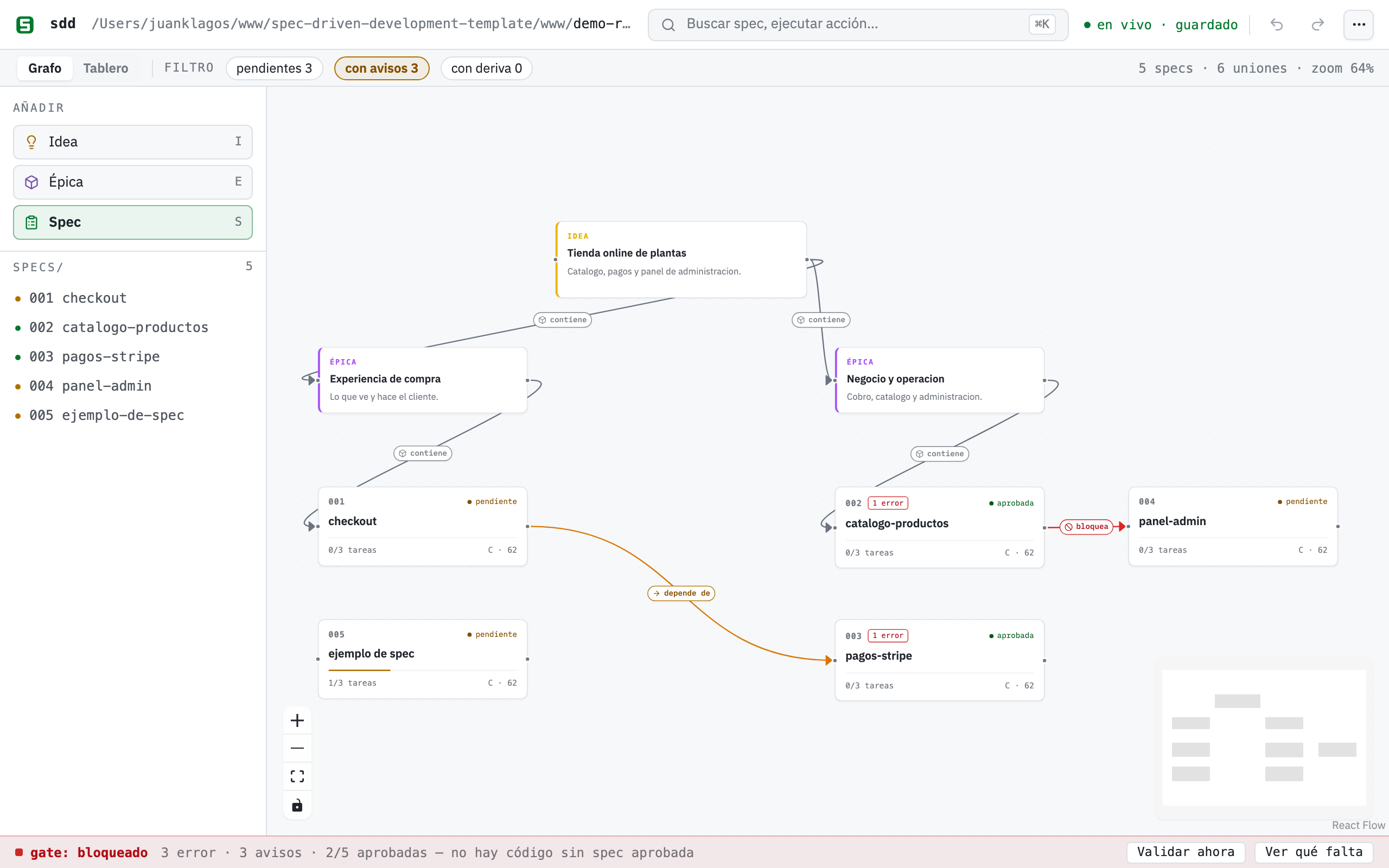
Un board, toda la verdad: el gate declara «bloqueado» con sus cuentas y su regla, las uniones tipadas dicen qué contiene qué y qué depende de qué, y el progreso y el puntaje de cada tarjeta se leen en vivo de tus .md.
Inicio rápido
Sección titulada «Inicio rápido»Lo único que necesitas instalado es Node.js 20 o superior. npx viene con Node, así que no hay nada que instalar globalmente, no hay que clonar este repositorio y no hay que compilar nada: el lienzo viaja dentro del paquete publicado. Son dos comandos.
Paso 1 — Pon SDD dentro de tu proyecto
Sección titulada «Paso 1 — Pon SDD dentro de tu proyecto»Elige el caso que sea el tuyo. Los dos usan el mismo comando y los dos dejan tu código donde está.
Proyecto nuevo (aún no existe la carpeta):
npx @juanklagos/create-sdd-project@latest mi-appcd mi-appProyecto que ya existe (tiene código, git, dependencias — da igual el lenguaje):
cd /ruta/a/mi-proyectonpx @juanklagos/create-sdd-project@latest .El punto significa «aquí mismo». No mueve, renombra ni sobrescribe ni uno de tus archivos: solo añade una carpeta spec/ al lado de lo que ya tienes. Dentro va todo lo de SDD — spec/idea/, spec/specs/, spec/bitacora/ y los scripts en spec/scripts/ — y al terminar el comando imprime tus siguientes pasos exactos.
Si te lo ejecuta un agente IA en vez de escribirlo tú, funciona igual: el andamiador detecta que no hay nadie que pueda responder una pregunta interactiva, toma los valores por defecto del sidecar y dice en su salida qué asumió.
Paso 2 — Abre el lienzo
Sección titulada «Paso 2 — Abre el lienzo»Desde la carpeta del proyecto (importa: el servidor descubre el workspace a partir del directorio en el que lo lanzas):
npx @juanklagos/sdd-mcp@latest --httpVerás exactamente esto:
SDD Builder — el lienzo / the board: http://127.0.0.1:3334/builderDashboard: http://127.0.0.1:3334/dashboardMCP endpoint (para tu agente / for your agent): http://127.0.0.1:3334/mcpAbre la primera URL, http://127.0.0.1:3334/builder, en tu navegador. Esa es el lienzo. La tercera (/mcp) no es una página: es el endpoint por el que se conecta tu agente IA, y si la abres en el navegador verás texto de protocolo, no un tablero.
El servidor se queda corriendo en esa terminal mientras lo uses; párralo con Ctrl+C. Si el puerto 3334 ya está ocupado, cámbialo:
SDD_MCP_HTTP_PORT=4000 npx @juanklagos/sdd-mcp@latest --httpY si prefieres lanzarlo desde otro sitio en lugar de entrar a la carpeta, dile dónde está el proyecto:
SDD_PROJECT_ROOT=/ruta/a/mi-proyecto npx @juanklagos/sdd-mcp@latest --httpPaso 3 — Lo que verás la primera vez
Sección titulada «Paso 3 — Lo que verás la primera vez»El lienzo abre vacío si el proyecto aún no tiene specs, y eso es lo correcto: en SDD todavía no hay contrato en disco. Un tour de bienvenida te ofrece cinco pasos anclados (paleta → crear → conectar → tareas → gate); descártalo con «No mostrar de nuevo» y relánzalo cuando quieras desde ⌘K («tour») o el menú ⋯. Para llenar el board de un tirón, usa el asistente desde ⌘K, que se explica más abajo.
Ruta larga: trabajar dentro de un clon de este repositorio (contribuyentes al template)
Solo si vas a modificar el propio builder o el template. Aquí sí hay que compilar el frontend, y el builder está bloqueado a propósito contra la raíz del template (no se ejecuta trabajo de proyecto destino ahí dentro), así que SDD_PROJECT_ROOT tiene que apuntar a otro workspace:
# una sola vez: compila el frontendnpm run builder:build
# crea un workspace de juego (o usa cualquier proyecto con sidecar spec/)./scripts/install-spec-sidecar.sh ~/sdd-playground --profile=recommended
# arranca el servidor apuntando a ese workspaceSDD_PROJECT_ROOT=~/sdd-playground npm run mcp:http:start
Dónde está cada cosa
Sección titulada «Dónde está cada cosa»Casi nada vive en botones: está en el buscador ⌘K (Ctrl+K en Windows y Linux) y en el menú ⋯. Escribes lo que quieres y pulsas Enter.
Las tablas completas —cada acción de ⌘K, los atajos de teclado y qué hace cada filtro— están en la referencia del builder, para que esta guía se pueda leer de corrido.
Tu primer proyecto con el asistente ✨
Sección titulada «Tu primer proyecto con el asistente ✨»La forma más rápida de pasar de nada a un board conectado es el asistente, en ⌘K («asistente») o en el menú ⋯. Describe tu proyecto en una frase — «una tienda online de plantas con catálogo, pagos y panel de administración» — y el builder propone un borrador de board: una nota de idea, 2-4 épicas y 3-6 specs agrupadas por los dominios que detecta (auth, pagos, catálogo, admin, API, notificaciones, perfil, búsqueda; con un fallback MVP genérico cuando nada encaja).
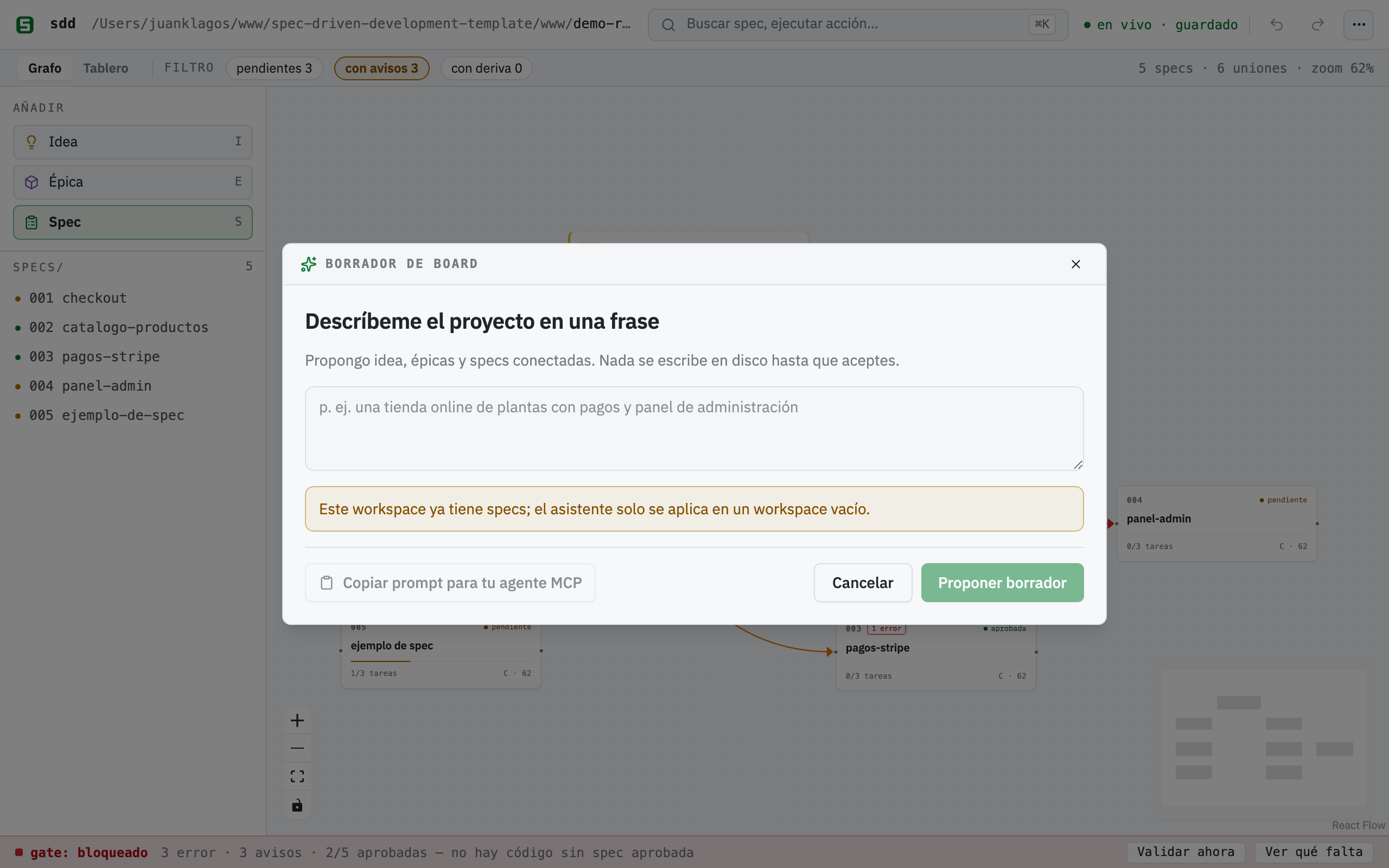
El borrador es una vista previa: renombra o quita specs, pulsa «↺ Regenerar» para nombres alternativos. Nada toca el disco hasta que confirmes.
Lo importante es lo que el asistente no hace: nunca llama a un LLM (no hay API keys que configurar, solo heurísticas locales) y no escribe nada hasta que pulsas «Crear N specs en disco». En ese momento ejecuta las mismas llamadas reales que la galería de plantillas — un POST /api/spec por spec más el lienzo pre-ordenado — así que terminas con bundles specs/NNN-slug/ auténticos, no maquetas. El asistente solo se aplica en un workspace vacío.
Si sí tienes un agente IA, la sección plegable «🤖 ¿Tienes un agente IA?» precarga un prompt orquestador copiable que delega el mismo trabajo a inteligencia real vía MCP — ver Desde un agente IA más abajo.
El lienzo, día a día
Sección titulada «El lienzo, día a día»Todo lo que hay en el lienzo corresponde a algo real:
- Las tarjetas de spec muestran el número y nombre del bundle, un badge de aprobación (Pendiente / Aprobado / Hecho) y una barra de progreso calculada con los checkboxes reales de
tasks.md. Arrastra una tarjeta Spec desde la paleta y ponle nombre: se crea al momento un bundle realspecs/NNN-slug/(spec, plan, tasks, history). - Las notas 💡 Idea y 📦 Épica son nodos de texto libres, con color, para dar forma a la historia alrededor de tus specs. Viven solo en
board.canvas. - Las uniones se dibujan arrastrando entre tarjetas — y en el momento de crear una se abre un selector de propósito sobre la propia unión (spec 010): contiene (gris, épica → spec), depende de (ámbar), bloquea (rojo), relacionada (azul, por defecto) o cualquier etiqueta libre. Doble clic en la unión para cambiar su propósito después. El propósito viaja en el campo
labeldeboard.canvas(las grafías ES y EN son canónicas) más uncolorestándar de JSON Canvas. - Mover tarjetas guarda posiciones (con debounce) en
board.canvas, y nunca toca tus.md. El lienzo tiene deshacer/rehacer (Cmd/Ctrl+Z, Shift+Cmd/Ctrl+Z) y un botón «Exportar PNG» (⌘K o el menú ⋯) para exportar el tablero como imagen.
Las uniones tipadas se ganan el sueldo con los avisos de dependencias: cuando una unión tipada conecta dos specs reales y la spec dependiente está aprobada pero su dependencia no, el builder avisa — un chip ámbar ⚠ N dep junto al semáforo del gate (lista completa en el tooltip) y un badge ámbar ⚠ dep en la tarjeta dependiente, en ambas vistas. Solo consultivo: el gate nunca se cierra por esto. En la captura de arriba, 002-checkout-y-pagos está aprobada pero depende de 004-envios-y-seguimiento, que sigue pendiente: no puedes cobrar el total sin saber el costo del envío. De ahí el aviso.
La barra del gate, fija abajo, es el hard stop de SDD hecho visible: veredicto (abierto / cerrado / bloqueado), las cuentas de errores, avisos y specs aprobadas, la regla escrita —«no hay código sin spec aprobada»— y dos botones, «Validar ahora» y «Ver qué falta». Los errores del gate aparecen como badge rojo ⚠ N con tooltip sobre la tarjeta afectada.
Al hacer clic en cualquier tarjeta de spec se abre el panel (drawer), el puente entre lienzo y markdown:
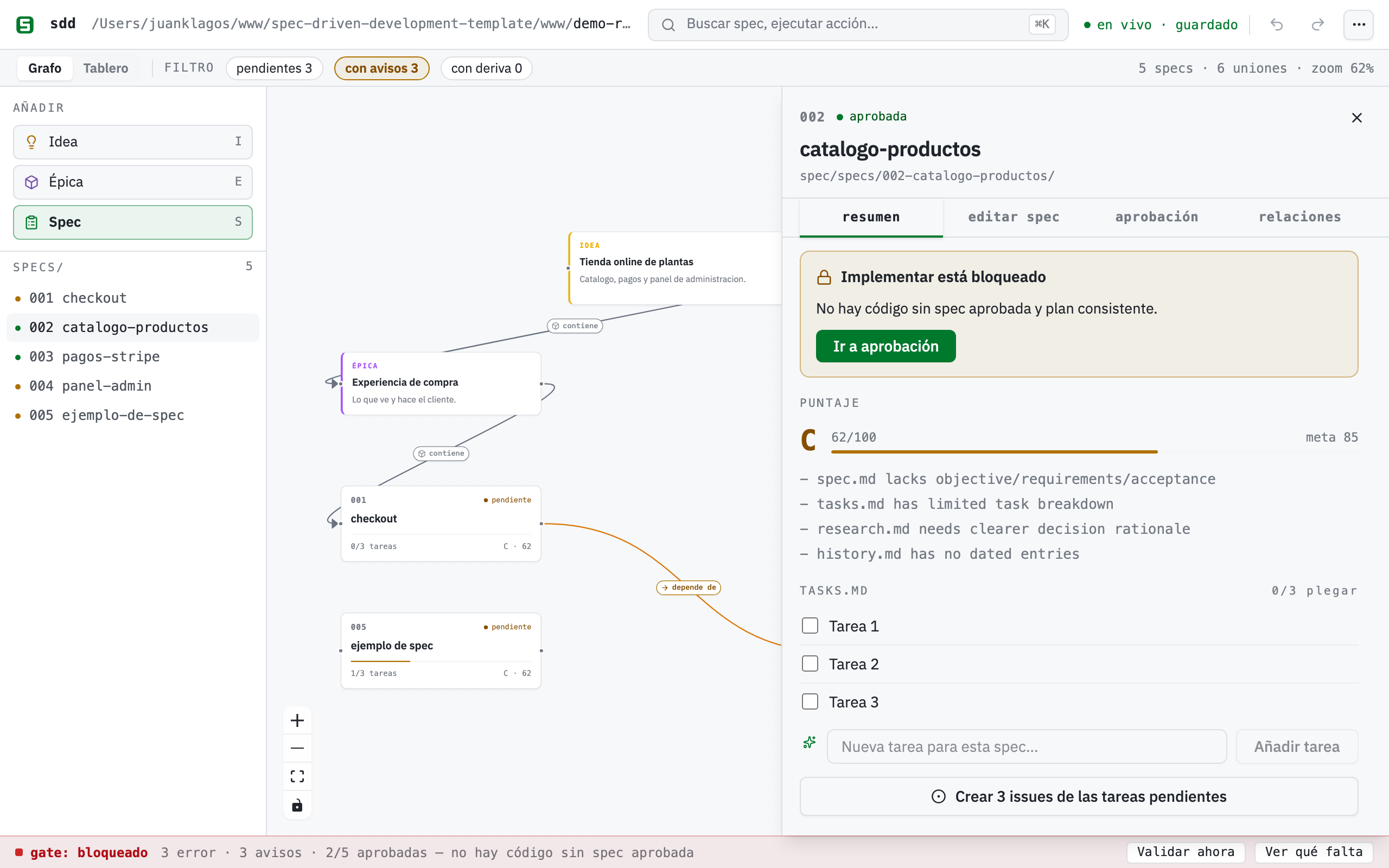
El panel de una spec aprobada: las tareas son los checkboxes reales de tasks.md, el botón «Implementar con agente» está habilitado porque la spec está aprobada, y las cuatro pestañas (Resumen, Editar spec, Aprobación, Relaciones) cubren el ciclo completo.
En el panel, las tareas son checkboxes vivos: marcar uno cambia solo esa línea - [ ] de tasks.md a - [x], y la barra de progreso de la tarjeta lo refleja. Debajo de las tareas tienes un extracto de spec.md en solo lectura — el contenido largo se edita en tu editor, por diseño: el lienzo compone, tu editor escribe.
La sincronización en vivo evita que las dos caras se desincronicen. El servidor vigila tu directorio specs/: edita cualquier tasks.md en tu editor y la tarjeta se actualiza sola, sin recargar. La barra de identidad muestra en vivo · guardado; si el servidor se reinicia con otro workspace, un banner ámbar te pide recargar. Regla de concurrencia: tu markdown siempre gana; el layout del lienzo es «último escritor gana».
Editar y aprobar specs
Sección titulada «Editar y aprobar specs»La pestaña «✏️ Editar spec» del panel es un editor guiado completo (spec 010): un formulario por CADA sección del template, en un acordeón ordenado al que puedes añadir, quitar y reordenar: historia de usuario, escenarios de aceptación, criterios EARS, requisitos, propiedades de la spec, criterios de éxito y fuera de alcance. Los guardados son quirúrgicos. Solo se reescriben los headings que editaste; el bloque de aprobación nunca se toca. El campo EARS autocompleta el prefijo CUANDO … EL SISTEMA DEBERÁ … al enfocar, y un lint EARS en vivo marca cada criterio en verde (con forma EARS) o ámbar (sugerencia) con una pista corta: normalmente el esqueleto a seguir, o una palabra vaga sin número medible detrás (rápido, fácil, intuitivo…). Solo consultivo: nunca bloquea el guardado. La misma regla está exportada para agentes como validateEarsCriterion en sdd-core.
Cuando la spec está lista, la pestaña «Aprobación» muestra el bloque real como formulario: estado y fecha en solo lectura (aprobar estampa Aprobado + la fecha de hoy), aprobador y evidencia editables. Lo escribe en spec.md sin tocar el resto del archivo. Si la spec no tiene bloque de aprobación, recibes un error claro en lugar de un arreglo silencioso. La pestaña «Relaciones» lista cada unión con propósito que toca la spec (entrantes/salientes) con su icono y color, y permite cambiar el propósito o eliminar la unión.
La aprobación desbloquea «Prepara el prompt exacto para tu agente»: un modal precarga el prompt exacto de arranque de implementación (ruta del workspace, carpeta de la spec, ejecutar la compuerta SDD, registrar consentimiento, hard stop, marcar tareas, cerrar con el contrato de sesión) detrás de un botón «Copiar prompt». Copy-first por diseño: sin deep links frágiles; funciona con Claude Code, Codex, Cursor, lo que sea. En una spec no aprobada el botón está deshabilitado con el hard stop explícito: no hay código sin spec aprobada y plan consistente.
El puntaje de la spec y el resumen EARS (spec 028)
Sección titulada «El puntaje de la spec y el resumen EARS (spec 028)»Bajo el encabezado del panel aparece el Puntaje de la spec: una nota (A/B/C/D), un número 0-100 y la lista de observaciones de qué falta. No es una métrica del lienzo: es el mismo scoreSpec que los agentes piden por MCP con sdd_score_spec (archivos presentes, secciones de la spec, señales del plan, desglose de tareas, rationale en research.md, historial con fechas), servido por GET /api/spec/:id/score. Canvas y agente nunca discrepan porque leen la misma función.
Al lado va el resumen EARS: N/M limpios, que pasa el mismo lint del editor guiado por todos los criterios de aceptación de la spec y te deja las pistas en el tooltip. Hasta ahora el lint solo existía criterio por criterio mientras editabas; ahora tienes el estado del conjunto de un vistazo.
Añadir tareas desde el panel (spec 028)
Sección titulada «Añadir tareas desde el panel (spec 028)»Debajo de la lista de tareas hay un campo «Nueva tarea para esta spec…» con su botón «Añadir tarea». Escribe y la línea - [ ] … se añade al final de tasks.md con la misma escritura atómica que usa el checkbox. Antes el lienzo solo sabía marcar tareas: añadir una obligaba a abrir una terminal o un editor.
La bitácora desde el lienzo (spec 028)
Sección titulada «La bitácora desde el lienzo (spec 028)»La acción Bitácora (⌘K o el menú ⋯) abre un modal para registrar los cuatro tipos de entrada sin salir del canvas: Decisión, Handoff, Daily log y Log global del proyecto. Cada tipo pide lo que necesita (nombre de archivo .md para decisiones y handoffs, fecha para el daily, texto suelto para el log global) y precarga un esqueleto de markdown como placeholder. Lo escriben los mismos escritores de sdd-core que usan las herramientas MCP y los scripts, así que el formato no se bifurca según por dónde entres.
STATUS y roadmap desde ⌘K (spec 028)
Sección titulada «STATUS y roadmap desde ⌘K (spec 028)»La acción Informes (⌘K o el menú ⋯) regenera STATUS.md y docs/roadmap.md a partir de specs/INDEX.md, los mismos generadores que sdd_generate_status y sdd_generate_roadmap. Confirma con un ✓ y vuelve a su estado normal a los pocos segundos; si falla, el error queda en el tooltip del botón en vez de desaparecer.
El semáforo de deriva (spec 025)
Sección titulada «El semáforo de deriva (spec 025)»Una vez aprobada una spec, el builder vigila si el código que gobierna siguió moviéndose. Si la spec declara una sección «Ámbito de archivos / File scope» y algún commit tocó esas rutas después de su fecha de aprobación, la tarjeta muestra un chip ámbar 🔀, y el drawer lista los commits responsables (hash, fecha, asunto). Es un simple git log × ámbito de archivos × fecha de aprobación — sin LLM, sin red, calculado una vez en sdd-core y pintado como el color de estado, así que el lienzo, la tool MCP y cualquier agente ven la misma señal. Es una señal, no un veredicto: decidir si el código contradice la spec, y cuál de los dos debe cambiar, sigue siendo tuyo (o de tu agente). Una spec sin ámbito declarado se lee como «sin ámbito» en vez de un falso «sin deriva»; un workspace que no es repo git degrada en silencio.
La vista de equipo
Sección titulada «La vista de equipo»El conmutador «Grafo ↔ Tablero» de la franja de contexto muestra las mismas specs como un kanban — tres columnas según el estado real de tus .md: Borrador · Pendiente, Aprobada (la línea Estado / Status del spec.md) y Hecha (todas las tareas marcadas). Las tarjetas conservan su barra de progreso y abren el mismo panel.
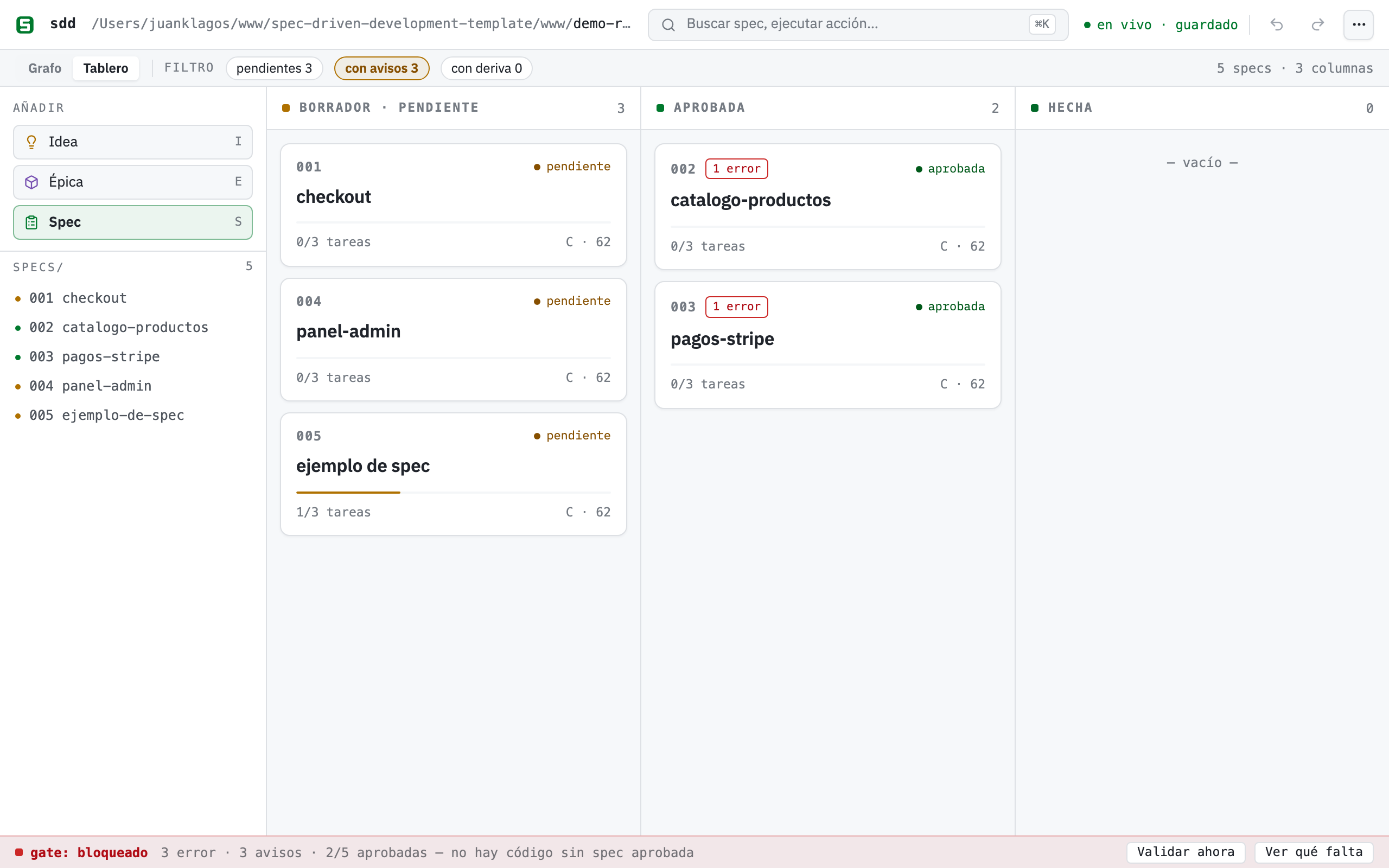
Los mismos datos, otra proyección: las columnas salen de spec.md y tasks.md, no de un estado aparte del tablero.
v1 honesta: arrastrar una tarjeta a otra columna no cambia nada en disco: aprobar es un acto real sobre la spec, así que al soltar aparece un toast («La aprobación se hace en la spec») con un botón «Abrir spec» directo al flujo de aprobación del panel.
Aquí viven dos funciones de equipo más:
- Tareas → issues de GitHub: en el panel, «Crear N issues de las tareas pendientes» crea un issue de GitHub por cada tarea pendiente vía tu
ghCLI local — título[<specId>] <tarea>para trazabilidad, cuerpo con enlace altasks.mddel bundle. Idempotente por título: las tareas cuyo título exacto ya existe se saltan, y el resultado se informa por tarea (creada / saltada / fallida) con enlaces. Degrada con honestidad: sin repo git, sin remote o singhautenticado recibes un error bilingüe claro que te dice exactamente qué ejecutar. - Trabajo en paralelo: varias personas (o agentes) pueden tener el builder abierto sobre el mismo workspace. Cada cambio en disco llega a todas las pantallas por el mismo canal en vivo — con el mismo hub SSE de la sincronización en vivo, incluidas entradas y salidas.
Plantillas
Sección titulada «Plantillas»Si prefieres partir de una forma probada en lugar de una frase, el botón 🧩 Plantillas abre una galería con cuatro playbooks: App web, API/Backend, E-commerce y SaaS. Cada uno crea specs reales más un tablero conectado y ordenado. Como el asistente, las plantillas solo se aplican en un workspace con cero specs.
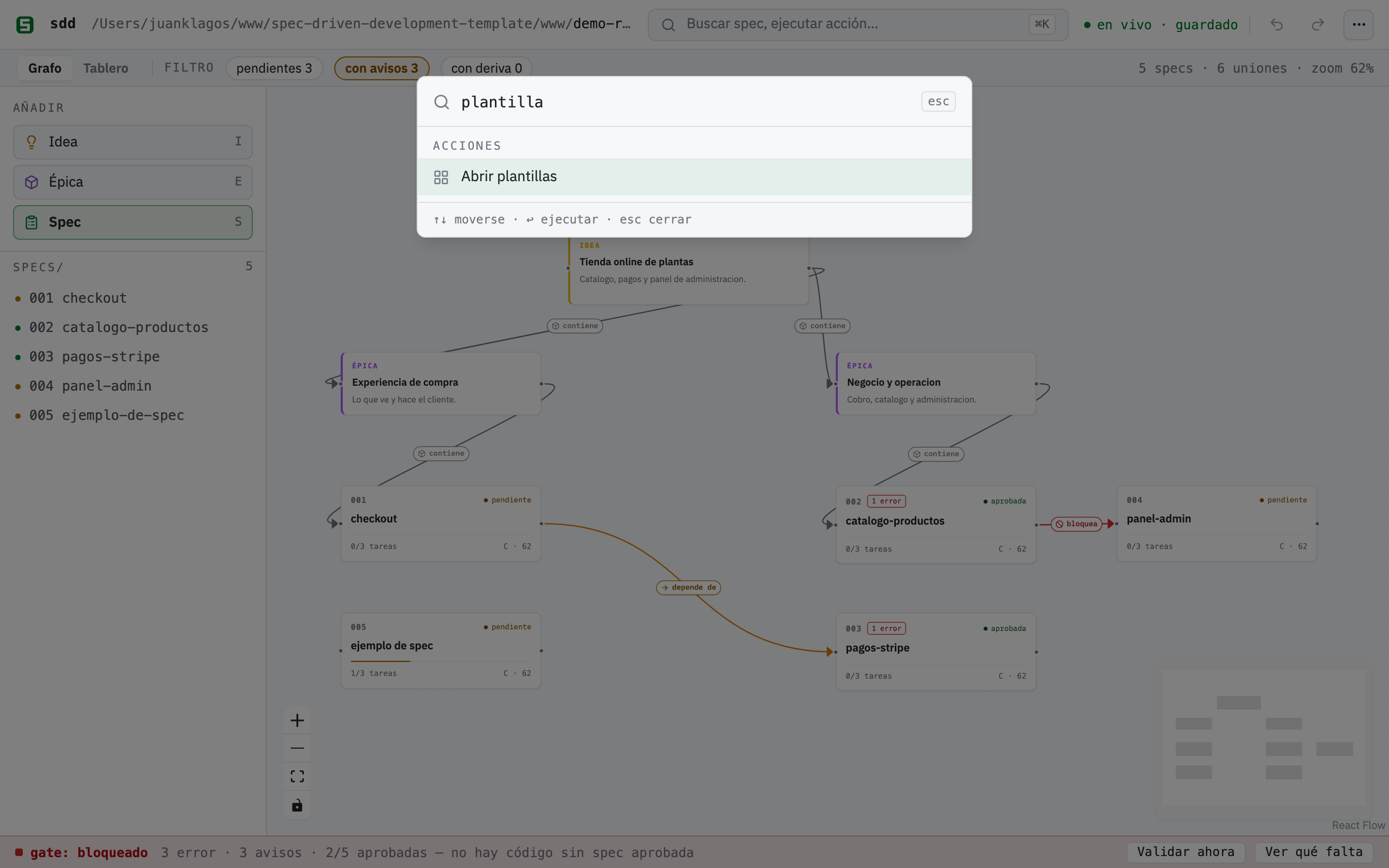
Cada tarjeta de plantilla te dice exactamente qué va a crear: bundles reales specs/NNN-… y un tablero conectado, sin placeholders.
Desde un agente IA (MCP)
Sección titulada «Desde un agente IA (MCP)»Cualquier cliente MCP conectado a sdd-mcp puede trabajar con el mismo board. Las tools del board — sdd_board_read, sdd_board_write, sdd_board_connect, sdd_read_tasks, sdd_set_task_done — están respaldadas por la misma capa sdd-core que el lienzo, así que lo que tu agente escribe es lo que ves en /builder (y viceversa). Los agentes también tienen los poderes del panel (sdd_gate_summary, sdd_approve_spec, sdd_update_spec_sections, sdd_create_spec), y los avisos de dependencias aparecen en el campo dependencyWarnings de sdd_gate_summary y de GET /api/gate. Ver guía 41 (referencia completa de MCP).
Conecta tu agente en un comando (spec 032)
Sección titulada «Conecta tu agente en un comando (spec 032)»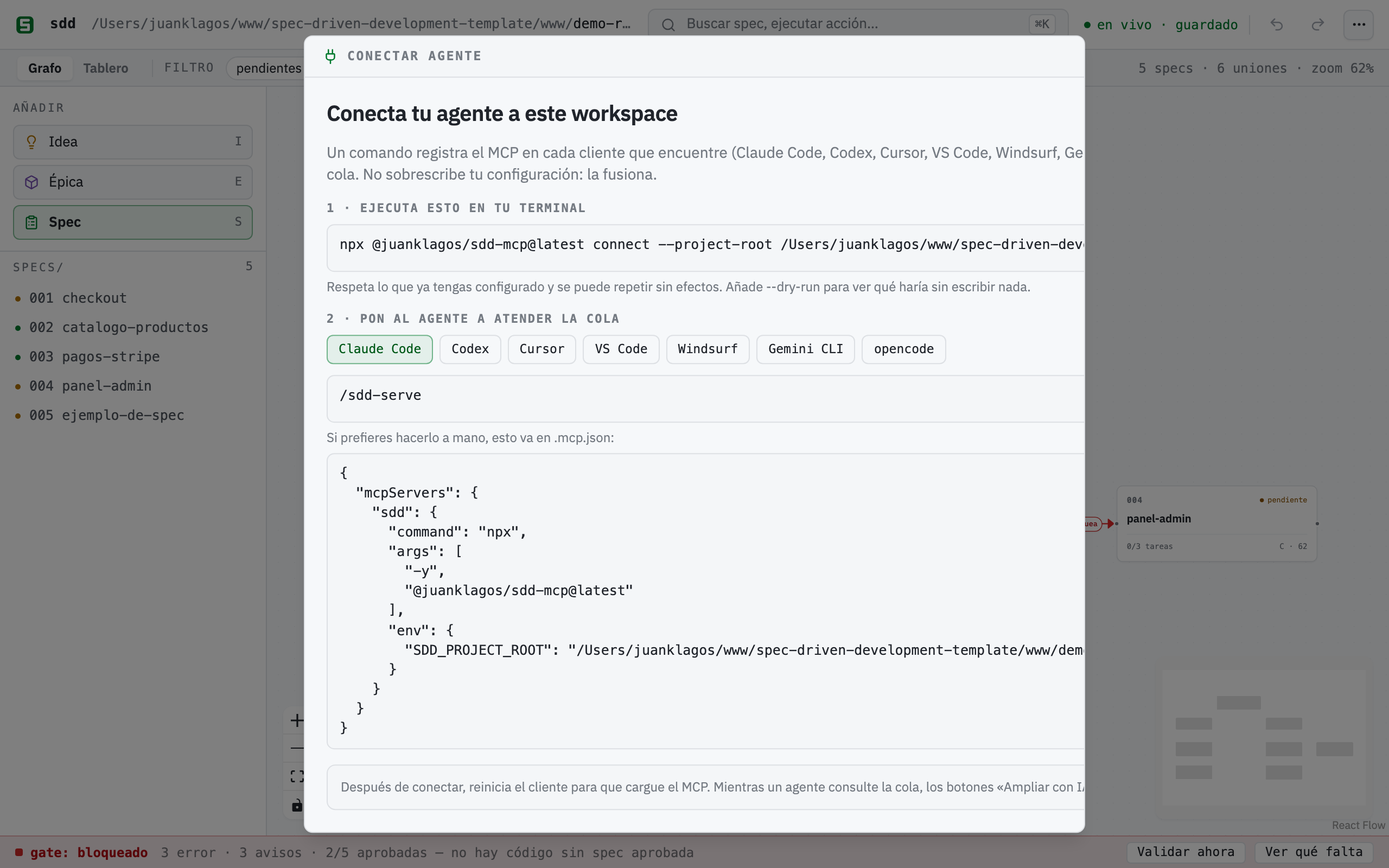
La forma corta, desde la carpeta de tu proyecto:
npx @juanklagos/sdd-mcp@latest connectDetecta qué clientes tienes, escribe la configuración MCP en el archivo propio de cada uno e instala la skill /sdd-serve que atiende la cola. No sobrescribe nada: fusiona la entrada sdd y deja el resto de tu configuración intacta; si algún archivo no se puede interpretar, lo deja como está y te lo dice. Ejecutarlo dos veces no cambia nada («sin cambios»).
| Cliente | Archivo que escribe | Clave | Atender la cola |
|---|---|---|---|
| Claude Code | .mcp.json |
mcpServers.sdd |
/sdd-serve |
| Codex | .codex/config.toml |
[mcp_servers.sdd] |
/sdd-serve |
| Cursor | .cursor/mcp.json |
mcpServers.sdd |
/sdd-serve |
| VS Code | .vscode/mcp.json |
servers.sdd |
prompt MCP sdd_serve_requests |
| Windsurf | .windsurf/mcp_config.json |
mcpServers.sdd |
prompt MCP sdd_serve_requests |
| Gemini CLI | .gemini/settings.json |
mcpServers.sdd |
/sdd:serve |
| opencode | opencode.json |
mcp.sdd |
/sdd-serve |
Opciones útiles:
--dry-run— imprime qué archivos tocaría y qué cambiaría, sin escribir nada.--client codex,cursor— solo esos clientes (útil si tienes uno instalado pero aún sin usar).--global— configuración de usuario en vez de la del proyecto.--project-root <ruta>— registra otro workspace.
Dentro del builder tienes lo mismo en ⌘K → Conectar agente (y en el aviso «sin agente» de cualquier botón ✨): muestra el comando ya con tu ruta y, por cliente, la configuración exacta por si prefieres pegarla a mano.
Tres caminos, porque en 2026 ninguno cubre a todos los clientes: la skill /sdd-serve (estándar abierto SKILL.md, lo leen Claude Code, Codex, Cursor y compatibles), los comandos nativos para Gemini y opencode, y el prompt MCP sdd_serve_requests, que no necesita instalar nada en los clientes que muestran prompts MCP como slash commands (Claude Code, VS Code; Codex todavía no lo soporta).
Conecta tu agente a mano
Sección titulada «Conecta tu agente a mano»El comando exacto por cliente — ejecútalo desde (o apuntando a) el proyecto en el que quieres que trabaje el agente. Todo lo que el agente escribe aparece en vivo en /builder (el watcher SSE recoge cada cambio en disco), y todo lo que haces en el builder lo ve el agente al instante.
Claude Code (un comando, desde el directorio de tu proyecto):
claude mcp add sdd --env SDD_PROJECT_ROOT=$(pwd) -- npx -y @juanklagos/sdd-mcp@latestCodex (añade a ~/.codex/config.toml):
[mcp_servers.sdd]command = "npx"args = ["-y", "@juanklagos/sdd-mcp@latest"]env = { SDD_PROJECT_ROOT = "/ruta/absoluta/a/tu/proyecto" }Gemini CLI (añade a ~/.gemini/settings.json, o al .gemini/settings.json del proyecto):
{ "mcpServers": { "sdd": { "command": "npx", "args": ["-y", "@juanklagos/sdd-mcp@latest"], "env": { "SDD_PROJECT_ROOT": "/ruta/absoluta/a/tu/proyecto" } } }}Claude Desktop / ChatGPT (conector HTTP): arranca el servidor HTTP y apunta un conector personalizado al endpoint Streamable HTTP:
SDD_PROJECT_ROOT=/ruta/absoluta/a/tu/proyecto npx @juanklagos/sdd-mcp@latest --http# URL del conector: http://127.0.0.1:3334/mcp (SDD_MCP_HTTP_PORT cambia el puerto)En clientes con soporte de MCP Apps, pedir el board renderiza la vista embebida dentro del chat (la tool sdd_board_app — ver la sección MCP App más abajo).
El prompt orquestador (IA real vía MCP)
Sección titulada «El prompt orquestador (IA real vía MCP)»La sección «¿Tienes un agente IA?» del asistente ofrece este prompt (cópialo también desde aquí). Pégalo en cualquier agente conectado a sdd-mcp y construirá el board con inteligencia real, incluidas las secciones borrador dentro de cada spec:
Eres mi agente SDD conectado al MCP `sdd-mcp`. Mi proyecto: "<describe tu proyecto>".Objetivo: puebla el SDD Builder board como el asistente ✨, pero con inteligencia real.1. Lee el estado actual con `sdd_board_read` (projectRoot: <ruta del workspace>).2. Propón 2-4 épicas y 3-6 specs con nombres claros, en minúsculas y sin acentos; enséñame la propuesta y espera mi OK antes de escribir nada.3. Con mi OK: crea cada spec real con `sdd_create_spec`; rellena su borrador con `sdd_update_spec_sections` (historia de usuario, escenarios, criterios EARS «CUANDO … EL SISTEMA DEBERÁ …», fuera de alcance); dibuja el board con `sdd_board_write` + `sdd_board_connect` (nota de idea → épicas → specs, edges etiquetados).4. No implementes código: el gate SDD sigue cerrado hasta que yo apruebe las specs.El board dentro de tu cliente IA (MCP App)
Sección titulada «El board dentro de tu cliente IA (MCP App)»El servidor también entrega el board como MCP App (SEP-1865, la primera extensión oficial de MCP — parte de la release del protocolo 2026-07-28, construida con el SDK oficial @modelcontextprotocol/ext-apps). En un cliente con soporte de MCP Apps, pide a tu agente que muestre el board — invoca la tool sdd_board_app y la vista se renderiza dentro del chat: tarjetas de specs con estado de aprobación y progreso de tareas, el lienzo con sus uniones tipadas, el semáforo del gate y los avisos de dependencias, más un botón «↻ Actualizar / Refresh» que relee el workspace. Solo lectura en v1, bilingüe, con modo claro/oscuro.
Dónde está de verdad el estándar: la spec MCP 2026-07-28 es una release candidate congelada desde el 2026-05-21 con publicación final el 2026-07-28; la extensión Apps tiene una revisión estable (2026-01-26) y un SDK publicado, así que esta vista está construida sobre la superficie estable. En la práctica:
- Funciona en hosts que implementan MCP Apps; el soporte se está desplegando en los clientes durante la ventana de finalización.
- Los hosts sin MCP Apps no se rompen:
sdd_board_appdevuelve los mismos datos de board + gate como texto JSON. - La vista es totalmente autocontenida (sin CDNs): el bridge oficial de ext-apps va inline dentro del recurso
ui://sdd/board.html. - A revisar tras el 2026-07-28: confirmar que el texto final de la spec mantiene
_meta.ui.resourceUri+text/html;profile=mcp-apptal cual y subir@modelcontextprotocol/ext-appssi sale una versión final.
Modo conectado: «Ampliar con IA» sin copy-paste (spec 031)
Sección titulada «Modo conectado: «Ampliar con IA» sin copy-paste (spec 031)»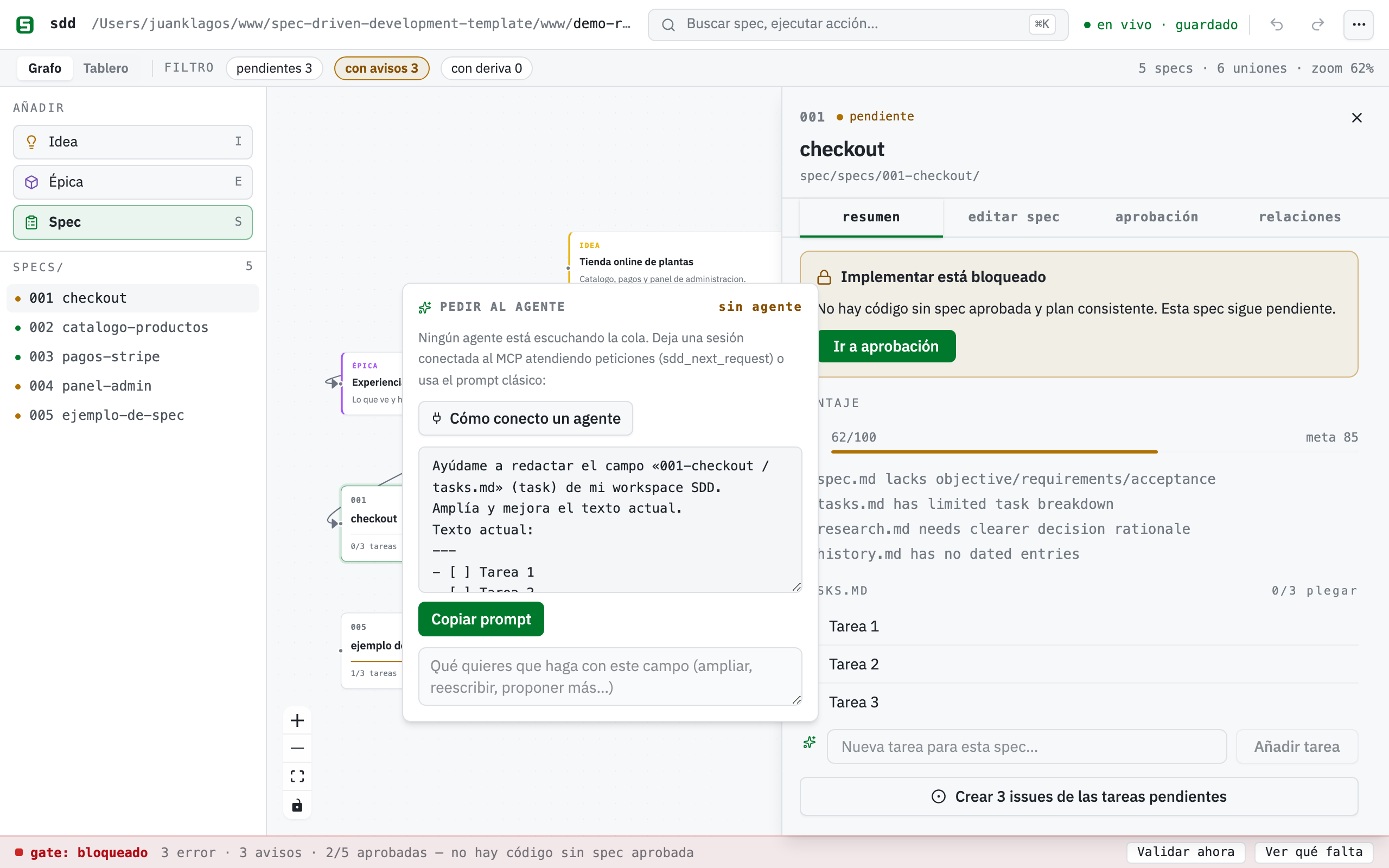
Todo campo editable de contenido del builder — las 7 secciones de spec.md,
las tareas, las notas del lienzo y los borradores de bitácora — tiene un botón
✨ Ampliar con IA. Al usarlo, el builder NO llama a ninguna API: publica
una petición en .sdd/requests/ y tu propia sesión de agente la atiende por
MCP. El ciclo completo:
- En el builder: pulsa «Ampliar con IA» en un campo, escribe la indicación y
envía. La petición queda visible en la barra de estado (
IA: 1 petición). - En tu agente (Claude Code u otro cliente MCP conectado): llama a
sdd_next_request— recibe la petición más antigua con el campo, su texto actual y tu indicación — redacta la propuesta y respóndela consdd_respond_request. El agente nunca escribe specs: solo propone. - De vuelta en el builder: la propuesta aparece sola como diff (actual vs. propuesto). Aceptar escribe solo ese campo por la ruta de siempre; Rechazar no toca nada.
Para dejar la sesión escuchando, pídele a tu agente algo como:
Atiende la cola del SDD Builder: llama a
sdd_next_request(projectRoot: …) en bucle; para cada petición redacta la propuesta y respóndela consdd_respond_request. No escribas ningún archivo de specs.
En Claude Code, /loop sirve exactamente para esto. Si ningún agente ha
consultado la cola en los últimos 5 minutos, los botones de IA lo dicen
(«sin agente») y ofrecen el prompt clásico copiable — nadie se queda
esperando. Una petición estancada >10 minutos se marca y se puede cancelar
desde la propia barra de estado.
El asistente ✨ también acepta una idea en bruto: Estructurar con IA manda el braindump por la misma cola y devuelve un borrador de spec completo (historia, escenarios, criterios EARS, requisitos) editable antes de crear nada. Los campos de aprobación y consentimiento no tienen botón de IA a propósito: son la firma humana del gate.
Limitaciones (honestas)
Sección titulada «Limitaciones (honestas)»- El contenido largo de
spec.mdmás allá de las secciones guiadas se edita en tu editor, no en el lienzo. - Borrar una carpeta de spec en disco no retira su tarjeta automáticamente (conservador; borra la tarjeta a mano).
- Un workspace por instancia del servidor (
SDD_PROJECT_ROOT). - La kanban es una proyección de solo lectura del estado: mover tarjetas entre columnas nunca aprueba ni desaprueba nada (usa el panel). La idempotencia de issues es por título (renombrar una tarea crea un issue nuevo).
- La demo interactiva en el sitio web sigue pendiente (requiere la FS Access API solo-Chrome); ver
specs/006-visual-spec-builder/.
Referencia rápida: lienzo → disco
Sección titulada «Referencia rápida: lienzo → disco»| En el lienzo | Qué pasa en disco |
|---|---|
| Arrastra una tarjeta Spec de la paleta y ponle nombre | Se crea un bundle real specs/NNN-slug/ (spec, plan, tasks, history) |
| Clic en una tarjeta de spec | Panel con sus tareas como checkboxes; extracto de spec.md en solo lectura |
| Marca un checkbox de tarea | La línea - [ ] de tasks.md pasa a - [x] quirúrgicamente |
| Conecta dos tarjetas, doble clic en la línea | Dependencia etiquetada (y opcionalmente tipada) guardada en board.canvas |
| Añade tarjetas 💡 Idea / 📦 Épica | Notas libres (con color) en board.canvas |
| Mueve tarjetas | Posiciones guardadas (con debounce) — nunca toca tus .md |
| Aprueba desde el panel | El bloque de aprobación real (estado, fecha, aprobador, evidencia) escrito en spec.md |
| Guarda en la pestaña Editar del panel | Solo se reescriben las secciones guiadas de spec.md — aprobación y requisitos intactos |
| Escribe en «Nueva tarea» y pulsa Añadir | Se añade una línea - [ ] … al final de tasks.md |
| Guardas una entrada en Bitácora | Un archivo real en bitacora/decisiones, handoffs, diaria o una entrada en bitacora/global/PROJECT_LOG.md |
| Ejecutas Informes | Se regeneran STATUS.md y docs/roadmap.md desde specs/INDEX.md |